
Most legacy PHP applications were built for one server. Sessions live in files on the local disk, uploads land in a folder next to the code, and nobody planned for a second machine because there was never going to be one. Then traffic grows, the single server runs hot, and the obvious fix, adding more servers, starts logging users out.
Sticky sessions are often the fastest way out of that corner. This post explains the problem, how sticky sessions solve it without touching application code, and why you should treat them as a stepping stone rather than the final architecture.
Why a second server breaks a legacy PHP app
By default, PHP stores session data with its files handler. When a user logs in, PHP writes a file named after the session ID to the directory set in session.save_path and sends that ID to the browser in the PHPSESSID cookie. On the next request, PHP reads the cookie and opens the matching file.
Put two servers behind a load balancer that spreads requests round robin, and the second request may land on a server that has never seen that session file. To PHP, the user is not logged in. The symptoms are familiar: random logouts, shopping carts that empty themselves, CSRF token errors on forms and multi-step wizards that lose their progress.
The clean fix is to move session storage somewhere every server can reach. In a large legacy codebase, that can mean auditing custom session handlers, serialized objects and code that writes to $_SESSION in unexpected places. Sticky sessions buy you the time to do that properly.
How sticky sessions work
With sticky sessions, also called session affinity, the load balancer remembers which backend served a user and keeps sending that user to the same backend.
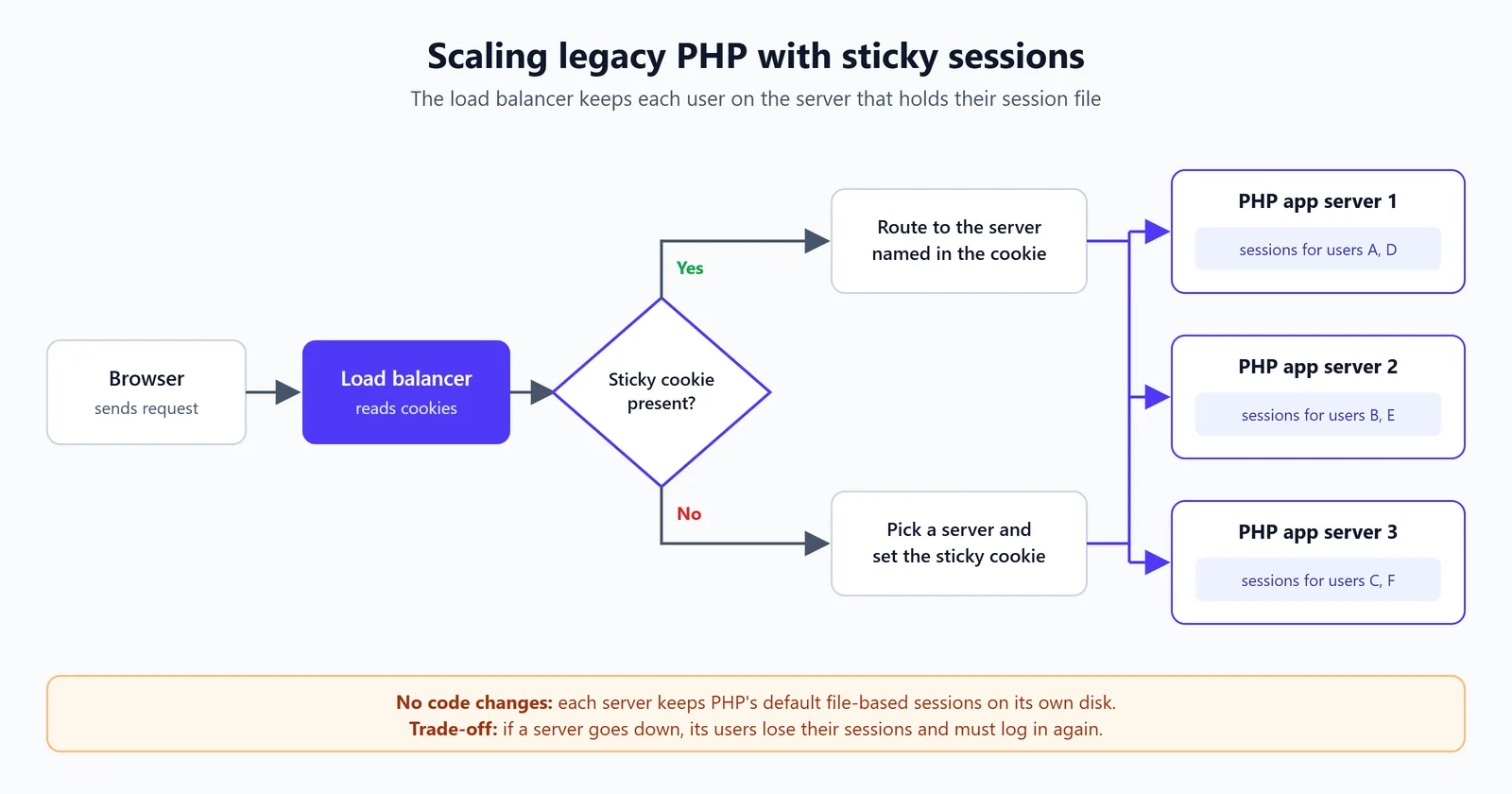
There are two common ways to do it:
Cookie-based affinity. On the first request, the load balancer picks a server and sets its own cookie that identifies it. Every later request carries that cookie, and the load balancer routes accordingly. Some load balancers can key on the application's existing
PHPSESSIDcookie instead. This is the most reliable option.Source IP hashing. The load balancer hashes the client IP address to choose a server. It needs no cookies, but users behind the same office NAT or mobile carrier gateway all land on one server, and a user whose IP address changes mid-session gets moved to a server without their session.
Either way, the PHP code does not change. Each server keeps its local session files, and each user only ever talks to the server that holds theirs.
What you gain
Horizontal scaling without a rewrite. You can add servers to handle more traffic in days rather than months.
Low risk. The change lives in infrastructure. From each user's point of view, the application behaves exactly as it did on a single server.
Warm local caches. Per-server caches such as APCu stay useful, because the same users keep hitting the same machine.
The trade-offs
Sticky sessions move the state problem around rather than removing it. Before you rely on them, know where they hurt:
Losing a server logs users out. If a backend crashes or is taken out of rotation for a deploy, every session stored on it is gone. Its users are routed to another server and have to log in again.
Uneven load. The load balancer can only spread new sessions. A few heavy users, or a large NAT group with IP hashing, can pin one server while others sit idle.
Slower scale-in and deploys. Removing a server without cutting off active users needs connection draining and patience, which makes autoscaling and rolling deploys less smooth.
Other local state still breaks. Sticky sessions only cover sessions. Files uploaded to local disk, local caches used as a source of truth and cron jobs that assume a single machine each need their own fix.
Moving off sticky sessions
Once the pressure is off, plan the move to a stateless application tier. For PHP, the main steps are usually smaller than teams expect:
Move sessions to a shared store. The phpredis extension ships its own session handler, so pointing
session.save_handlerat Redis is often a configuration change. Memcached and database-backed handlers are alternatives.Move uploads to shared storage, such as object storage, so any server can serve any file.
Turn off affinity on the load balancer once every server can handle every request, and confirm that logins survive a server being removed.
Test session locking as part of this move. The files handler locks a session for the length of a request, and some legacy code depends on that without anyone knowing. Check how your new handler behaves when the same user sends concurrent requests, such as AJAX calls fired in parallel.
Summary
Sticky sessions let a legacy PHP application scale beyond one server without changing its code, by making sure each user keeps returning to the server that holds their session. They come with real costs: lost sessions when a server dies, uneven load and harder deploys. Use them to buy time, then move sessions and files to shared storage so any server can handle any request. If you also want to ship changes without logging anyone out, see our post on zero-downtime deployments.